How to Use Drone Photos to Create Professional Landscape Design Master Plans
Real-estate agents, landscapers, and drone operators rely on aerial photography to show scale, boundaries, and layout. But drone photos come with a hidden problem: from above, even premium properties often look like empty dirt with no story.
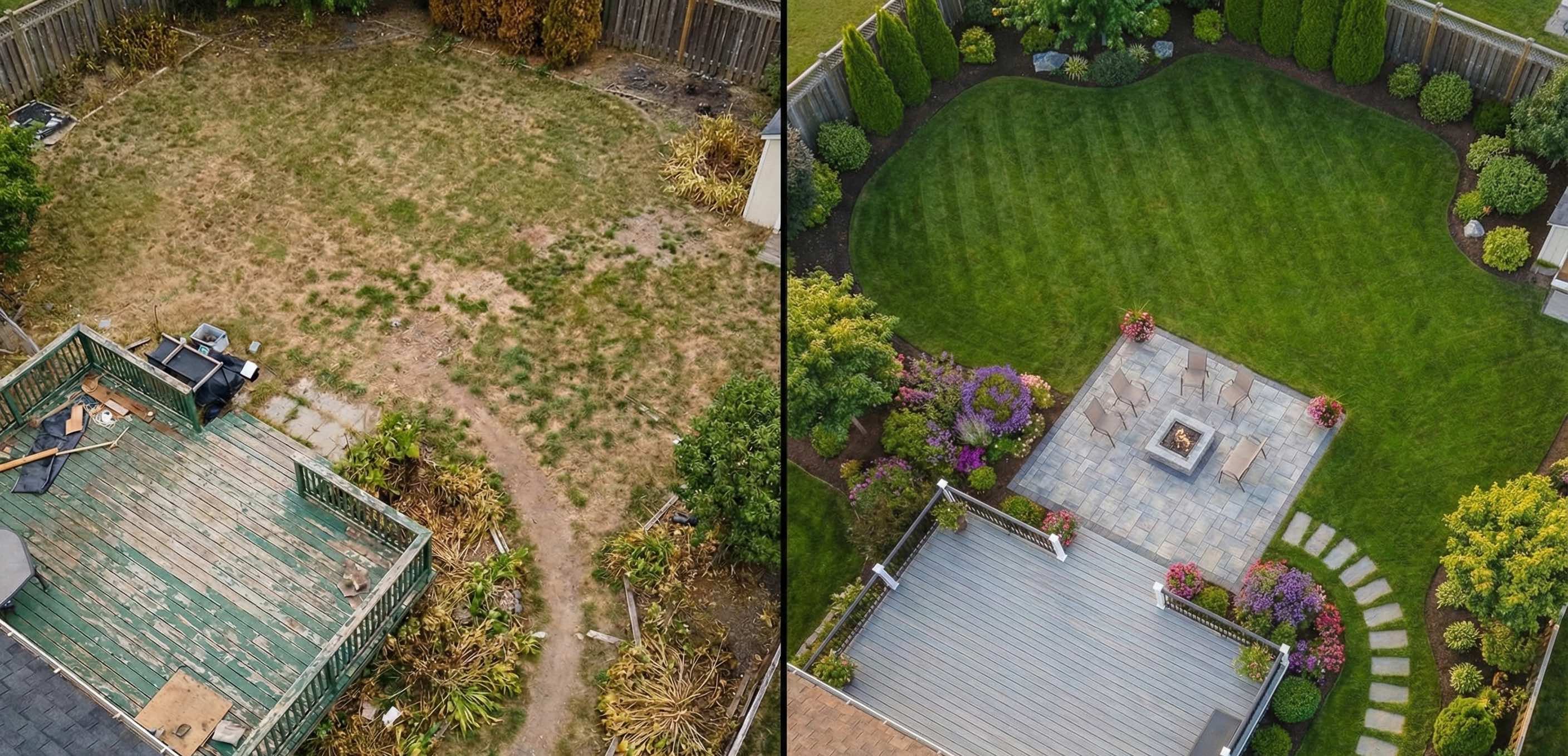
In 2025, listings above $800k almost always include drone photography. It’s the fastest way to communicate lot size, slope, and context. Yet raw aerials rarely help buyers visualize what the property could become.
A bird’s-eye view removes depth, warmth, and intention. Instead of seeing opportunity, clients see cost.
The “Empty Lot” Problem in Drone Landscape Design
Ground-level photos invite people to notice details — plants, textures, finishes. Drone photos do the opposite: they force viewers to judge layout and flow.
For professionals, this creates friction during sales conversations.
You’ve probably said things like:
- “The pool would go here…”
- “This corner works perfectly for a fire pit…”
- “A retaining wall would define this zone…”
But without a visual anchor, most clients can’t connect those ideas. They don’t see a plan — they see dirt.
Turning Aerial Photos into Landscape Master Plans
Modern AI visualization changes how professionals use drone imagery. Instead of rebuilding the site manually in CAD or SketchUp, you can now transform a drone JPG into a clear landscape master plan in minutes.
The result isn’t a marketing render — it’s a decision-making visual that shows zones, circulation, and lifestyle potential.
Why This Works for High‑Value Projects
1. You Sell the Entire Property, Not Individual Features
Drone photos are used for large-scale projects: pools, pergolas, outdoor kitchens, hardscape systems. A master plan lets clients see how everything fits together — turning a renovation into a cohesive estate concept.
2. Aerial Perspective Done Correctly
Most design tools struggle with drone angles. Objects float, scale breaks, and perspective feels wrong.
GardenDream uses depth-aware AI designed for aerial viewpoints, ensuring patios sit on the ground, planting zones follow terrain, and shadows reinforce realism.
3. Faster Proposals and Shorter Sales Cycles
When a lead sends a drone photo, you can respond with a visual concept before scheduling a site visit. That speed builds confidence and separates you from competitors still explaining ideas verbally.
Pro tip: Don’t describe a pool. Show the pool, the deck, and the surrounding lounge areas directly on the client’s property.
Best Practices for Capturing Drone Photos for Landscape Design
If you’re a drone pilot, agent, or designer, these guidelines dramatically improve AI-based landscape visualization:
-
Avoid Straight-Down (90°) Shots Satellite-style images remove depth and reduce usable perspective.
-
Use the 45° Angle Rule A slight angle gives the AI visual cues for building height, terrain changes, and spatial relationships.
-
Shoot During Golden Hour Longer shadows help define slopes, edges, and structures — essential for accurate master planning.
-
Keep the Entire Lot in Frame Master plans work best when circulation, boundaries, and transitions are visible.
Who Uses Aerial Landscape Master Plans
Professionals already using drone-based master plans include:
- Landscape designers preparing renovation proposals
- Real-estate agents marketing premium listings
- Property developers validating site potential
- Drone operators offering value‑added visualization services
The common goal is the same: turn aerial photos into something clients can immediately understand and act on.
Stop Selling Dirt. Start Selling a Vision.
Drone photography shows scale — but master plans show intent.
Whether you’re pitching a $50k landscape renovation or marketing a high‑end property, transforming aerial photos into clear landscape designs helps clients say “yes” faster.
Have a drone photo of a blank property? Upload it to GardenDream and generate a professional landscape master plan in seconds.
Visualize Your Aerial Photo Now
Frequently Asked Questions (FAQ)
Can I use regular drone photos, or do they need to be professionally shot?
You can use standard consumer-drone photos (DJI, Autel, etc.). As long as the image is clear, well-lit, and shows the full property, GardenDream can generate an effective landscape master plan. Professional shots help, but they are not required.
What type of professionals use drone-based landscape master plans?
Landscape designers, landscapers, real-estate agents, property developers, and drone service providers use aerial master plans to speed up proposals, improve client understanding, and close higher-value projects.
Is this a replacement for CAD or landscape architecture software?
No. Aerial AI master plans are designed for early-stage visualization and sales, not construction drawings. Many professionals use GardenDream before moving into CAD for final measurements and permits.
How accurate are the scale and proportions?
The visual plans are proportionally consistent with the original aerial photo, making them ideal for layout discussions and concept approvals. Final construction dimensions should always be validated on-site.
Can I generate multiple design options for the same property?
Yes. You can create multiple variations from the same drone image to compare layouts, styles, or feature placement during client discussions.
Does this work for sloped or irregular terrain?
Yes. Shadows, perspective, and visible elevation changes in the drone photo help the AI understand terrain differences, making it suitable for non-flat lots.
How long does it take to create a master plan?
Most aerial visualizations are generated in seconds, allowing you to respond to leads and client requests almost immediately.